
✔ Copy 100+ working torrent trackers below to instantly boost speed and fix downloads stuck at 0%.
🚀 Tested | ✔ Working | 🔄 Updated Daily
✅ Last Updated: April 2026
🔄 Live Tracker List: Automatically updated using verified public tracker sources.
A torrent tracker list is a collection of servers that help connect peers in BitTorrent. Adding multiple working trackers increases download speed by improving peer availability and connection reliability.
⚡ Works with qBittorrent, uTorrent, BitTorrent
Torrent tracker list 2026 helps boost download speed by connecting to more peers. These 100+ updated trackers can fix torrents stuck at 0% and improve reliability instantly.
👉 We tested 200+ trackers based on speed, uptime, and peer availability to find the best working trackers.
👇 Scroll below to copy the full updated tracker list.
This updated torrent tracker list helps improve download speed by connecting to more peers using working trackers in 2026.
⚡ Best Torrent Trackers (Quick Answer)
- udp://tracker.opentrackr.org:1337/announce
- udp://open.stealth.si:80/announce
- udp://open.demonii.com:1337/announce
📌 What Is a Torrent Tracker List?
A torrent tracker list is a collection of tracker URLs that help your torrent client find peers faster, improving download speed and reliability.
📦 What Is a Torrent?
A torrent is a peer-to-peer file sharing method where data is downloaded from multiple users instead of a single server.
⚙️ How Torrenting Works
- Open a torrent file or magnet link
- Your client connects to trackers
- Trackers help find peers
- Your client downloads pieces from multiple users
🌍 Public vs Private Torrent Trackers
Public trackers are open to everyone and easy to use, while private trackers require registration or invitation and usually offer better speed and reliability.
🌍 Public Torrent Trackers
- ✔ Free and open to everyone
- ✔ No registration required
- ✔ Easy for beginners
- ❌ Lower reliability
🔒 Private Torrent Trackers
- ✔ Faster speeds
- ✔ Better quality control
- ✔ Reliable seeding
- ❌ Harder to join
🏆 Top Torrent Trackers 2026
- opentrackr — ⭐ Fastest
- stealth.si — ⭐ Very fast
- demonii — ⭐ Stable
📊 Tracker Performance (Top Picks)
| Tracker | Protocol | Speed |
|---|---|---|
| opentrackr.org | UDP | ⭐ Fastest |
| open.stealth.si | UDP | ⚡ Very Fast |
| open.demonii.com | UDP | ⚡ Fast |
📋 Full Tracker List
💡 Pro Tip: Add 10–20 trackers for best speed.
⚠️ Your IP is Visible While Torrenting
Anyone in the torrent network can see your real IP address when using public trackers.
🔐 Protect Your IP & Torrent Safely📊 How Many Trackers Should You Use?
Use 10–20 trackers for optimal performance.
🔗 UDP vs HTTP vs HTTPS Trackers
- UDP — fastest
- HTTP — compatible
- HTTPS — secure
⚙️ How to Add Torrent Trackers
- Open your torrent client
- Right-click the active torrent
- Select Edit Trackers or Properties
- Paste the tracker list
- Click Apply or OK
💻 Add Trackers in Popular Clients
qBittorrent
- Right-click the torrent
- Select Edit Trackers
- Paste the tracker list
- Click OK
uTorrent
- Right-click the torrent
- Open Properties
- Paste the trackers
- Click Apply
How do I update trackers in Utorrent
To do this, follow the below steps.
1. Open uTorrent client.
2. Begin the download of your favorite torrent.
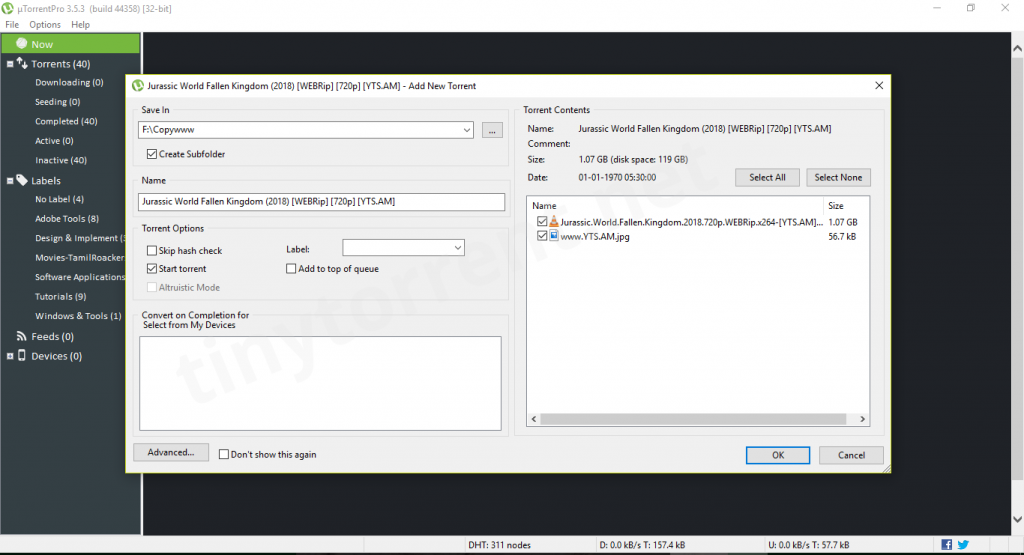
3. Right click on the name of the downloaded torrent and then select “Properties”.
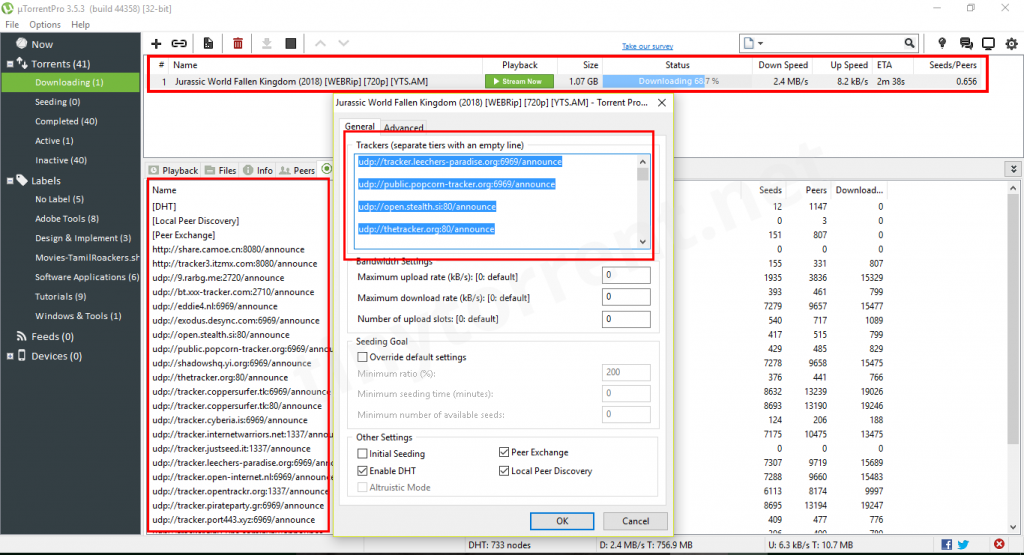
4. In General, tab pastes the torrent trackers which you copied from the above list under the Trackers (separate tiers with an empty line) box.
5. Click on “OK”.
Note: It takes a few seconds to update additional seeders and peers. Now you can observe your download speed.
If you come across any other stable/working active torrent trackers list than please leave me a comment below will update the same with our torrent trackers list.
📈 Why Trackers Improve Speed
- ✔ More peers
- ✔ Better connectivity
- ✔ Faster downloads
- ✔ Fewer stalled torrents
🚀 How to Increase Torrent Speed
- ✔ Add multiple working trackers
- ✔ Choose torrents with high seed counts
- ✔ Use a stable internet connection
❌ Torrent Not Downloading — Stuck at 0%?
- ✔ Add updated trackers
- ✔ Check if seeds are available
- ✔ Restart the torrent client
- ✔ Check firewall or network restrictions
⏳ Torrent Stuck on Metadata?
This usually means no peers are available. Add working trackers and wait for active seeders to connect.
❓ Torrent Tracker & Download Issues (Quick Answers)
Why is my torrent stuck on downloading metadata?
This usually happens when there are no active peers. Add working trackers and wait for seeders to become available.
Why is my torrent not downloading even with seeds?
Your client may not be connecting properly. Try adding fresh trackers, checking firewall settings, and restarting the client.
How do I increase torrent download speed?
To increase speed, add multiple trackers, use a fast internet connection, and select torrents with more seeders than leechers.
How many torrent trackers should I add?
Adding 10–20 working trackers is ideal for better peer discovery and more stable download speeds.
What does tracker not responding mean?
This means the tracker is offline or unreachable. Replace it with a working tracker from the updated list above.
🔐 Stay Safe While Torrenting
Your IP is visible while using public torrent trackers.
To stay private and avoid tracking, use a trusted VPN.
❓ Frequently Asked Questions
What is a torrent tracker?
A torrent tracker helps connect peers so they can share files efficiently using BitTorrent.
Do torrent trackers increase download speed?
Yes. Adding multiple working trackers improves peer connections and can increase speed.
Is it safe to use public torrent trackers?
Public trackers are open and can expose your IP address. Using a VPN is recommended for privacy.
Why should I use multiple trackers?
Multiple trackers improve availability, redundancy, and download reliability.
📚 Related Guides
- Best Torrent Clients for Speed
- Is Torrenting Safe?
- How to Use VPN for Torrenting
🎯 Final Verdict
Copy the updated tracker list above, add them to your torrent client, and boost your download speed instantly.






… [Trackback]
[…] Informations on that Topic: tinytorrent.net/best-torrent-tracker-list-updated/ […]
… [Trackback]
[…] Read More: tinytorrent.net/best-torrent-tracker-list-updated/ […]
Got another working tracker…
udp://explodie.org:6969
thanks for sharing the working tracker list… I will update with my latest torrent tracker list
A Very useful list….Thanks for sharing it
Welcome Laura 🙂
udp://www.eddie4.nl:6969/announce
I use that one, leechers-paradise, coppersurfer and explodie.
thanks it really increases speed 🙂
Thanks 🙂
Thanks a lot
Really works
Thank you so much for your comment Joel.
Team Tiny Torrent.
Thanks allot. Now I’m off to The Pirate Bay to steal… I mean, backup some movies…… yeah.
Thanks for trackers it’s working in india.
please add FIFA 17 delux edition torrent trackers
it really works thankyou
You’re welcome Karan.
Let me know how the tips work out for you. Please go ahead and share.
please add xbox360 iso game tracker.
Hi try this given torrent trackers
udp://tracker.coppersurfer.tk:6969/announce
udp://explodie.org:6969/announce
udp://p4p.arenabg.com:1337/announce
udp://tracker.leechers-paradise.org:6969/announce
udp://tracker.zer0day.to:1337/announce
udp://tracker.opentrackr.org:1337/announce
udp://9.rarbg.com:2710/announce
Thanks
Full of shite, liked shared and still blocked.
Hi let me know what is blocking you…
shit , i liked in facebook and the unlocked content was not unlocked :/
Sorry :-(, looks there is some caching issue so you might faced the problem. Just refresh your browser and try.
Sorry for that but How to use these list ?
Copy all the trackers.
Open uTorrent client
Right click on the torrent and select “Properties” from the context menu
Paste the tracker list under the general tab or double-click on the torrent file you will get the same window.
Click on “OK”.
Enjoy torrenting
it does not work for me
Thanks for visiting tinytorrent.com. it’s perfectly working and able to see some good speed in download, try again and let me know.
vwery good
working and good speed but usually have 1 mbps speed
many trackers bring to your pc exploit attack connection with zombie servers boot.
We had verified all those trackers in our lab, don’t worry go ahead and use those recommended torrent trackers list while you download any torrent content.
Team Tiny Torrent.
trackers will not connect on qbittorent. what am i missing???
It should work with qbittorrent.. try once again and let me know.
This is a good list. Thanks =)
Thanks Michael:-)
Thank you its working with Utorrent I’m trying it rn I have much KB!
You’re welcome Tamika.
Let me know how the tips work out for you. Please go ahead and share.
thank u bro u just made my day.
i thought it will take forever to download 60 gb file…
I’m glad it was useful Amir. Let me know how things work out for you or if there’s anything else you want me to help you with.
This piece of writing presents clear idea in support of the
new people of blogging, that genuinely how to do blogging and site-building.
Thnx guyz 80% of the list works
Saran, Thanks for visiting tiny torrent.
Really?
Do you actually think that you can unilaterally add trackers to an existing torrent and make it work?
How will all the other peers on the torrent know about your “new” trackers?
Yes, you can add the given trackers list with the existing torrents. Basically this will give more no.of connections and new trackers helps us to find more no.of peers.
This trackers doesnt work please help me !
Downloading multiple movies, applications used torrent trackers list given our post, It’s perfectly working. NOTE: sometimes torrent trackers take time, so you may get server timeout.
Kindly use the latest tracker list from the post and let me know how it went for downloads.
Thanks,
Team Tiny Torrent
Helped me to download torrents fast.
Thanks.
essa lista funciona no DELUGE??
copy all the trackers from here and paste it to under default defaulttrackers.conf. The defaulttrackers.conf file can be traced in “~/.config/deluge/” directory like ~/.config/deluge/defaulttrackers.conf. more info refer the given link
https://dev.deluge-torrent.org/wiki/Faq#WheredoesDelugestoreitssettingsconfig
Deluge default trackers Sample:
{
“file”: 1,
“format”: 1
}{
“trackers”: [
{
“url”: “udp://tracker.tiny-vps.com:6969/announce”
},
{
“url”: “udp://inferno.demonoid.pw:3418/announce”
},
{
“url”: “udp://tracker.grepler.com:6969/announce”
},
{
“url”: “udp://tracker.internetwarriors.net:1337/announce”
},
{
“url”: “udp://tracker.aletorrenty.pl:2710/announce”
},
{
“url”: “udp://tracker.kicks-ass.net:80/announce”
},
{
“url”: “udp://tracker.sktorrent.net:6969/announce”
},
{
“url”: “udp://tracker.flashtorrents.org:6969/announce”
},
{
“url”: “udp://tracker.bittor.pw:1337/announce”
}
]
}
Thanks for sharing your thoughts on crée site. Regards
It works wery well in the start but it is stuck in 30kb/s.
thanks for following our site… got any luck :-), Let me know will try to help sharing more trackers.
Thanks for trackers it’s working in Egypt
Hey Ramzad, glad you liked it!
Can we use it for a totally dead torrent (no seeder at all) ?
yes we can…but its depends on the torrent health.
Out of all the trackers listed above, only nine are consistently working during my two months trial. Let it be known, that if you don’t add those trackers to your uploaded torrent file, they will not add any speed to your download!
udp://tracker.coppersurfer.tk:6969
udp://thetracker.org:80/announce
http://t.nyaatracker.com:80/announce
udp://bt.xxx-tracker.com:2710/announce
udp://tracker.tiny-vps.com:6969/announce
udp://open.stealth.si:80/announce
udp://retracker.lanta-net.ru:2710/announce
udp://tracker.internetwarriors.net:1337/announce
udp://tracker.opentrackr.org:1337/announce
OMG Awesome!!! I got around 600kb/s when normal downloading, after adding these trackers list my download speed is 3.2Mb/s.
Thanks for this list. 🙂 love from Colombo
Thanks ji… you saved my time…
Thanks fa the share… working perfectly… with my high speed ISP i’m getting around 8 to 9Mbps/s
http://agusiq-torrents.pl:6969/announce
why is polish web? ;D
thank you for sharing the torrent tracker list
Opentracker online
udp://opentracker.sktorrent.org:6969/announce
New public open tracker:
udp://tracker.fixr.pro:6969/announce
Awesome article….. Thanks for the list of torrent trackers. After adding given torrent trackers list my download speed is increased to 4x. Thanks again.
Glad our article helped to you…
thanks Jessie
Team Tiny Torrent
Do I have to add the trackers list when I create new torrent for the purpose of increasing the upload speed?
yes we need to add those torrent trackers list
Thankyou for your list..
Wonderful, what a website it is! This webpage provides valuable facts to us, keep it up.
Appreciation to my father who informed me concerning this website,
this website is genuinely awesome.
Good article! We are linking to this great post on our website.
Keep up the good writing.
Thanks
Please double-check your copy/paste there must be spaces in between each tracker, if not, manually add spaces otherwise your list is useless. Major improvements thought regarding speed and complete thanks for a great job in making our time-stressed lives much easier.
please add: udp://tracker.ololosh.space:6969/announce
Thanks will add the same in working trackers list
new public tracker:
udp://tracker.ololosh.space:6969/announce
Hi Potato, Thanks for the list, Will add the list to the existing torrent trackers for the public to access
Most of these trackers simply don’t work! they come back as proxy connection error. does that mean they don’t work through a proxy?
Please try again. its perfectly working
Just tried these (June 1st 2021)
ALL but 4 of them are not working.
Thanks Tee. let our team fix the list please check the updated torrent trackers list
thank you for your utorrent track list
Thanks Ronald.
Very Much thanks………………… it works….. Working it’s great
Let me know how the tips work out for you.
Team Torrent Trackers list